B2B positioning should determine which pages your website needs, what visitors see first, and how they move toward an inquiry. Start with the customer, the problem they need to solve, your offer, and the evidence behind it. Use those decisions to plan navigation, page hierarchy, content, and calls to action before detailed design begins.
A company may have a clear positioning statement while its website still tells an older story. The business sells integrated solutions, but the navigation lists individual products. The team specializes in manufacturing, but visitors find no relevant projects or technical expertise.
Closing that gap requires decisions about where information belongs and how buyers find it. This guide explains how to make those decisions, with an example structure and a checklist for reviewing your own website.
What Positioning Needs to Define Before Website Planning
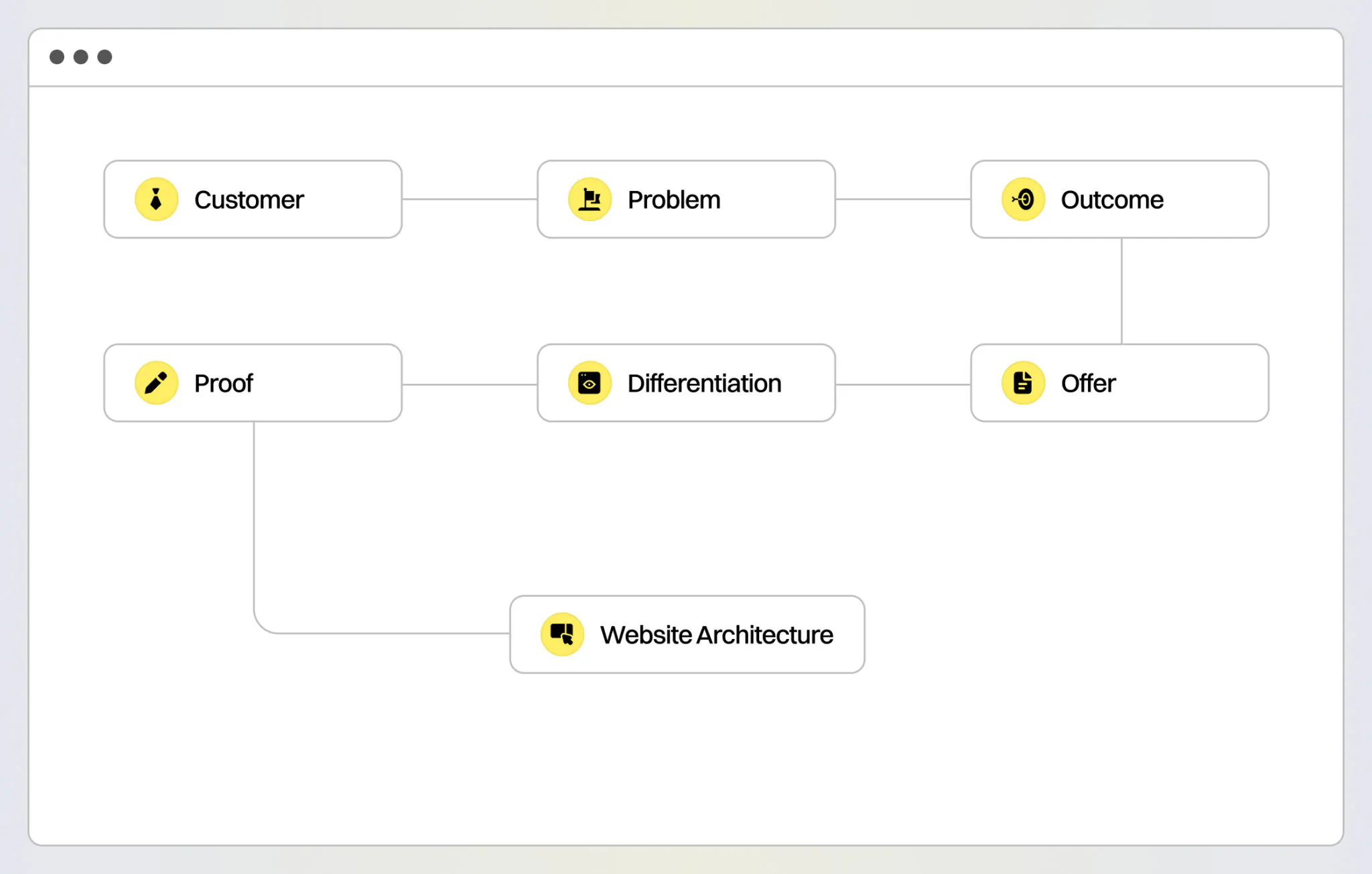
Positioning explains who your company serves, what makes its offer relevant, and why a buyer should choose it over alternatives. To guide website planning, those answers need to be specific enough to shape pages.
Start with these questions:
- Customer: Which companies are the best fit, and who evaluates the purchase?
- Buying trigger: What usually causes them to look for a provider?
- Outcome: What do they need to improve or achieve?
- Offer: Which products, services, or capabilities deliver that outcome?
- Differentiation: Why would they choose your approach?
- Proof: What evidence supports those claims?
Each answer should lead to a structural decision.
| Positioning decision | Website implication |
|---|---|
| Primary customer | Prioritize relevant audiences and markets on the homepage |
| Buying trigger | Create entry points around recognizable problems |
| Desired outcome | Explain business value before detailed features |
| Core offer | Define product, service, or platform pages |
| Differentiation | Give the strongest reasons to choose you enough visibility |
| Proof | Place relevant cases, results, and technical evidence near claims |
| Buying process | Choose suitable CTAs, forms, and supporting resources |
If these answers are still unclear, approving a sitemap will be difficult. The team will be deciding which pages matter without agreeing on what the website needs to communicate.
Start With Buyer Questions and Sales Evidence
An existing sitemap is useful for auditing content, but it may no longer represent how the business sells.
Review recent sales conversations, customer interviews, CRM notes, and questions from qualified prospects. Look for patterns:
- What problem brings buyers to the company?
- What do they need explained before the offer makes sense?
- Which objections delay a decision?
- What evidence helps them evaluate fit?
- What information do different stakeholders request?
For example, a software company may organize its platform into three modules. Buyers may describe their needs as reducing reporting errors, automating compliance, or improving operational visibility.
Those problems can become solution pages. Module pages can explain the functionality behind each solution, with links between them. Buyers get a familiar starting point while technical detail remains accessible.
For B2B website design and development, this research helps define the scope: which pages to create, what content to prepare, and where the existing website falls short.
Choose Navigation That Reflects How Buyers Evaluate the Offer
The first items in your navigation communicate what the company considers most relevant.
- Products work when buyers know the category, model, or specification they need
- Services work when the service is a familiar buying category
- Solutions help visitors who recognize a problem before they know what to buy
Industries and audience pages add useful routes when requirements differ substantially between markets or roles.
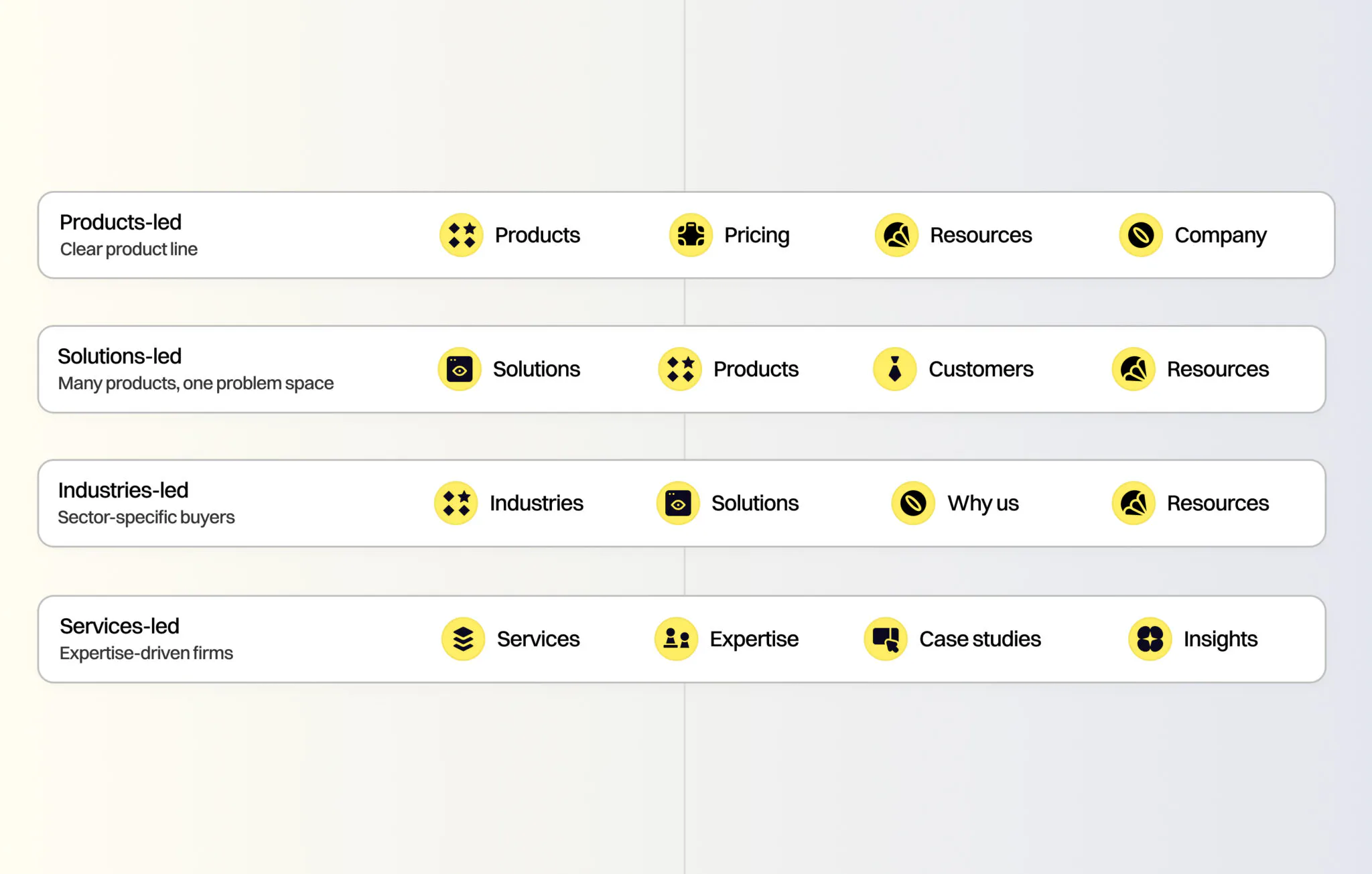
A manufacturer might use:
Products · Applications · Industries · Resources · Company
An enterprise software provider might use:
Solutions · Platform · Industries · Customers · Resources
A solution-led website can still give engineers direct access to product specifications. An industry-led site can retain a familiar service directory. The priority is to make the most common journeys clear without requiring visitors to understand internal department names.
For a closer comparison of the options, see our guide to structuring a B2B website around products, services, solutions, industries, or audiences.
Build the Homepage Around a Clear Evaluation Sequence
The homepage should help a new visitor establish relevance, understand the offer, assess credibility, and choose where to go next.
A useful starting sequence is:
- Establish the category and audience. Explain what the company provides and who it serves.
- Introduce the main problems or offers. Give visitors recognizable routes into the website.
- Explain the difference. Show what changes when buyers choose your approach.
- Provide evidence. Use relevant customer work, results, technical detail, or testimonials.
- Offer a suitable next step. Help visitors explore further or contact the team.
The order can change. An established supplier may need product access immediately, while a new company may need to explain its offer first.
Make the First Screen Specific
A headline such as “Technology Built for What Comes Next” leaves buyers guessing about the category and offer.
For a hypothetical tax software company, “Tax software for GCC finance teams managing VAT and e-invoicing” establishes the product, market, audience, and use case. The supporting copy can then explain coverage and implementation.
Give Differentiation Space Below the Headline
If industry expertise is central to the positioning, show relevant projects early. If buyers choose the company for complex integrations, explain those capabilities and link to implementation evidence.
Repeating a positioning statement in several sections adds little. Each section should answer another evaluation question.
Give Each Page Type a Distinct Role
A complex B2B website can include products, services, solutions, industries, and audiences. The structure becomes difficult to use when all of them repeat the same content.
| Page type | Main question it should answer |
|---|---|
| Product or platform | What does it do, and how does it work? |
| Service | What can you deliver, and what does the engagement include? |
| Solution | How can you solve this customer problem? |
| Industry | How does your offer apply to this market’s requirements? |
| Audience | What does someone in this role need to evaluate? |
| Case study | What have you delivered in a relevant situation? |
| Insight or resource | What does the buyer need to understand during research? |
Solution Pages: Connect Problems With Capabilities
A company may offer data engineering, software development, and consulting. A buyer may need to modernize outdated data infrastructure, which requires several of those capabilities together.
A solution page should explain:
- The problem and its operational consequences.
- The outcome the engagement is intended to support.
- The approach and capabilities involved.
- Relevant implementation considerations.
- Evidence from comparable work.
- The next step for discussing requirements.
Link to service pages for delivery details. Avoid copying their full descriptions into the solution page. Use recognizable labels such as “Legacy Data Modernization.” Broad labels such as “Unlock Growth” provide little guidance about what sits behind the link.
Industry Pages: Demonstrate Relevant Knowledge
Industry pages need information that justifies a separate destination. A manufacturer may need to understand production integration and operational continuity. A healthcare organization may have different data handling and implementation requirements. Explain the requirements your company actually addresses and provide relevant evidence. Changing only the industry name across otherwise identical pages gives buyers little reason to trust a specialization claim. If meaningful differences are limited, a focused section on an existing page may be enough.
Audience Pages: Address Different Evaluation Needs
Create them when the information needs differ enough to support useful content. Engineering may need compatibility and documentation. Executives may need implementation risk and business value. Procurement may need supplier credentials and commercial requirements. Each audience page should connect visitors to shared product, solution, and case study pages. This keeps technical details and evidence consistent across the website.
Place Proof Where Buyers Need It
Every major positioning claim creates a question: what supports it? An enterprise implementation claim needs evidence of relevant delivery complexity. Manufacturing expertise needs industrial projects and technical context. A measurable performance claim needs a result with enough explanation to interpret it.
Place that evidence close to the claim it supports:
- Use a relevant customer example on a solution page.
- Explain integration experience beside integration capabilities.
- Add an industry-specific testimonial where buyers assess market fit.
- Link a project result to a case study explaining scope and context.
Use only results you can substantiate, and distinguish delivered work from measured business outcomes. A redesigned inquiry form does not establish an increase in qualified leads unless that increase has been measured.
Match Calls to Action to the Sales Process
A CTA should reflect what the buyer is ready to do and what the company can provide next.
Typical options include:
- Start a Trial for a product buyers can evaluate independently.
- Book a Demo when the software needs a guided explanation.
- Discuss Your Project for work that requires scoping.
- Request a Quote when buyers can describe the purchase requirements.
- Talk to an Engineer when technical suitability needs clarification.
Supporting actions can help visitors who are still researching: view specifications, explore a relevant case study, or review implementation details. Forms should collect what is needed for the next step. A custom project inquiry may require scope and timeline. A documentation request should not automatically use the same qualification form. Make the expectation clear beside the form: what the visitor is requesting and what happens after submission.
Example: Turning B2B Positioning Into a Website Structure
Consider a hypothetical procurement platform for healthcare organizations. Its positioning centers on reducing manual supplier evaluation and keeping purchasing decisions traceable.
The structural choices should follow those priorities:
| Website section | Example pages or content |
|---|---|
| Solutions | Supplier Evaluation; Procurement Workflow Automation; Purchasing Audit Trails |
| Platform | Core Capabilities; Integrations; Security and Data Handling |
| Healthcare | Healthcare Procurement Requirements; Relevant Workflows and Customer Evidence |
| Resources | Implementation Guides; Procurement Evaluation Checklist |
| Company | Team; Company Background; Contact |
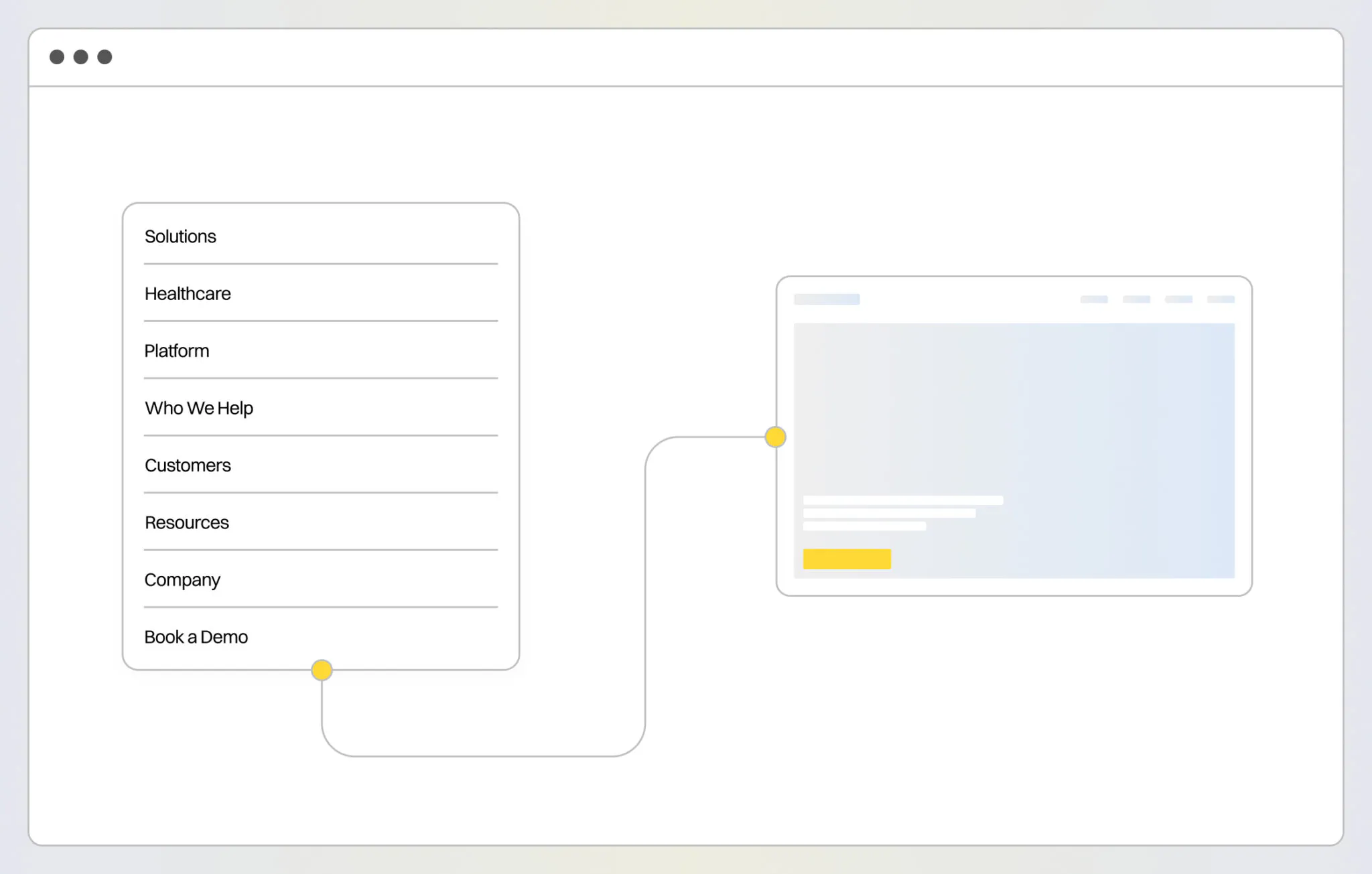
Primary CTA: Book a Demo.
- The homepage would introduce the platform and healthcare audience, explain the main procurement problems, show how the platform addresses them, and provide available customer evidence.
- A Supplier Evaluation page would explain that workflow and link to the relevant platform capabilities. The healthcare page would cover market-specific requirements without repeating the entire product description.
- Role-specific pages for procurement or compliance teams could be added if research shows substantially different evaluation needs. A Customer Stories section would make sense once there is enough publishable evidence to support it.
This example deliberately uses one industry. A company focused exclusively on healthcare does not need an Industries menu containing a single destination.
Plan Content and SEO Before Changing the Structure
Assign a Main Topic and Buyer Need to Each Page
A product page can explain functionality and specifications. A solution page can address a problem that several capabilities solve together. An insight can answer a narrower research question in depth. These pages may share terminology, but each needs a distinct reason to exist. Avoid creating separate pages for minor keyword variations when the content would answer the same question.
Use Descriptive Internal Links
Connect related pages where the connection helps the reader. A solution page can link to relevant products, implementation resources, and customer work. Google’s internal linking guidance recommends concise, descriptive anchors that fit the surrounding content. For example, “supplier evaluation software” communicates more about a destination than “learn more.” There is no fixed ideal number of links per page. Use standard crawlable links and avoid adding several keyword-heavy anchors simply to repeat a target phrase.
Map Existing URLs Before Launch
Review current traffic, inquiries, backlinks, and page content before deciding what to remove or merge. For each existing URL, record whether it will stay, be updated, merge into another page, or be retired. Where a URL changes and a relevant replacement exists, plan a permanent redirect and update internal links to the new destination. The CMS also needs to support the relationships in the sitemap. Editors should be able to connect products, solutions, industries, and cases without manually rebuilding every related-content section.
Keep AI Search Expectations Grounded
Google’s guidance on AI search features says established SEO practices remain relevant to AI Overviews and AI Mode. It does not require special AI markup or a separate writing format. Clear pages, accessible text, relevant internal links, and useful evidence give buyers and search systems more information to work with. A new structure alone does not guarantee rankings or inclusion in AI-generated answers.
How VALMAX Connects Positioning With Website Planning
At VALMAX, our corporate website development process begins with discovery: business and product interviews, a review of available content and analytics, and research into the market and competitors. Those findings inform the structure before wireframes and visual design.
Two projects illustrate different starting points.
Spright: Establishing the Message Before the Website
Spright needed to explain its offer as a B2B growth marketing startup. We began with founder interviews, research, and positioning, then developed website content and brand identity around the agreed direction.
The Spright brand strategy and website case study shows how clarifying the message gave subsequent content and design work a shared foundation.
Air Cargo: Making an Evolved Offer Visible
Air Cargo had an established logistics history, while its website needed to communicate its role as a software-driven platform more clearly.
We reorganized the information architecture around product value and key platform components. The Air Cargo website and interface redesign also covered the product interface, aligning the public website and platform experience with that direction.
When to Bring in an External Team
A headline update or a new case study may be manageable internally. Broader support becomes useful when positioning changes the sitemap, content models, user journeys, or technical requirements.
Before commissioning design, agree on the priority audiences, navigation, page roles, content requirements, and treatment of existing URLs. Our checklist for selecting a corporate website development company includes questions for assessing this work alongside development and delivery.
B2B Website Structure Checklist
Before approving the sitemap, check that:
- The homepage identifies the offer and its primary audience.
- Navigation uses language buyers recognize.
- The main customer problems have clear entry points.
- Products, services, and solutions have distinct content roles.
- Industry pages contain relevant expertise and evidence.
- Audience pages address meaningfully different evaluation needs.
- Major claims have supporting proof nearby.
- CTAs and forms match the actual sales process.
- Related pages connect through descriptive internal links.
- Existing URLs, content, and search performance have been reviewed.
- The CMS can support the planned content relationships.
- The team knows who will write, approve, and maintain each page.
If several points remain unresolved, settle them before approving detailed page layouts. Otherwise, content decisions may force changes to designs that are already complete.
If your website still presents an offer your business has outgrown, discuss your B2B website project with VALMAX. Share what has changed in your positioning and where buyers struggle to understand the offer so we can discuss the scope of work.
Key Takeaways
- Translate positioning into decisions about navigation, page roles, content priority, proof, and conversion paths.
- Use buyer questions and sales evidence to determine the main routes through the website.
- Give each page a distinct purpose and connect it to relevant supporting information.
- Create industry and audience pages when their content justifies a separate destination.
- Plan content ownership, internal links, CMS relationships, and URL changes before implementation.
FREQUENTLY ASKED QUESTIONS
What Is the Difference Between Positioning and Website Messaging?
Positioning defines who the company serves, how its offer compares with alternatives, and why buyers should choose it. Messaging expresses those decisions in language. Website structure determines where those messages appear and how visitors reach them.
Does New Positioning Require a Complete Website Redesign?
The scope depends on what changes. Revised wording and proof may fit the existing structure. A different audience, offer, or sales model may require new navigation, page types, content relationships, and conversion paths.
How Can We Avoid Repeating Content Across Website Sections?
Define each page’s main question before writing. Keep detailed product information on product pages, explain customer problems on solution pages, and use industry pages for market-specific context. Link to shared information instead of copying it across sections.
Can Better Website Structure Improve SEO?
A logical structure and relevant internal links can help search engines discover pages and understand their relationships. SEO performance also depends on content quality, technical implementation, competition, and other factors. Changing navigation alone does not guarantee higher rankings.
GET A TEAM THAT’S ALWAYS ON YOUR SIDE
Retainer Contract gives you reliable support whenever you need it
rate this article
5 / 5.0

based on 1 reviews