To select a corporate website development company, compare relevant project experience, technical capabilities, information architecture, CMS flexibility, QA, client reviews, and proposal transparency. Review live websites, ask how critical integrations would be implemented, and confirm ownership, support, exclusions, and change-request terms before signing a contract.
How Do You Select a Corporate Website Development Company?
The most reliable approach is to compare agencies against the same criteria instead of judging each one by its sales presentation. Start with comparable projects, then verify technical capabilities, development process, CMS approach, reviews, pricing, QA, ownership, and post-launch support.
For a corporate or B2B website, the selected company should be able to explain how its approach supports your business requirements and show evidence from previous projects.
Use these seven areas as the initial filter:
- Relevant corporate, B2B, or enterprise website experience.
- Detailed case studies and working live websites.
- Technical expertise that matches your requirements.
- Clear distinction between custom development and templates.
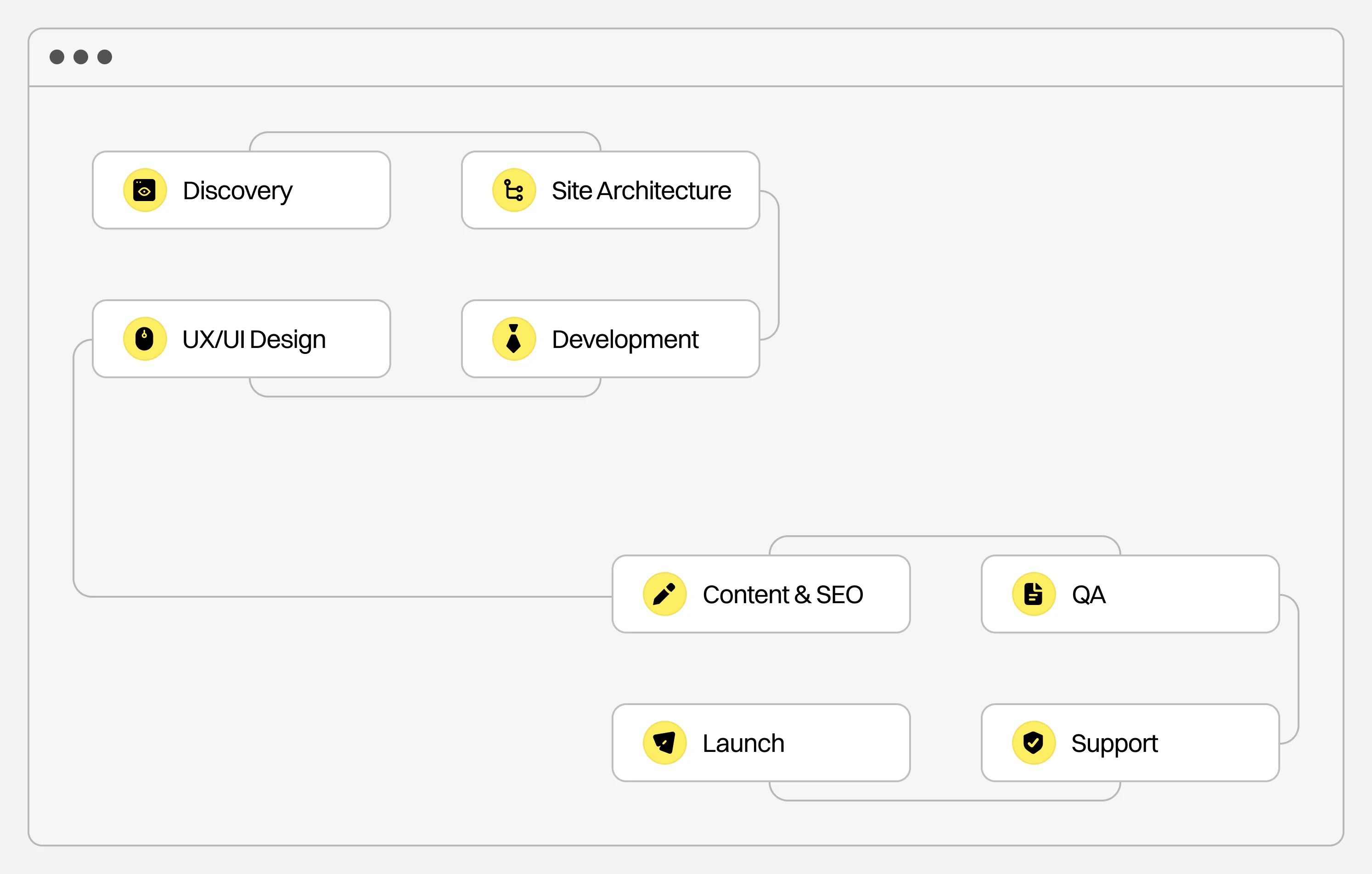
- Defined discovery, UX, development, QA, and launch process.
- Detailed independent client feedback.
- Transparent scope, pricing, exclusions, and ownership terms.
This matters even more for B2B companies because buyers increasingly conduct their own research before speaking with sales. Gartner’s 2026 survey of 646 B2B buyers found that 67% preferred a rep-free buying experience, while 45% had used AI during a recent purchase. A corporate website therefore needs enough structure, clarity, and useful information to support independent research (Source: Gartner, 2026).
Corporate Website Development Company Comparison Table
| Evaluation Criterion | What a Strong Company Should Show | Red Flag | What to Ask |
| Relevant experience | Corporate, B2B, or enterprise websites with comparable requirements | Portfolio consists mainly of simple marketing sites | Have you completed a website with requirements similar to ours? |
| Portfolio | Live websites and detailed cases explaining scope and implementation | Mockups without project details | What exactly did your team handle in this project? |
| Custom development | Clear explanation of custom UX, CMS, code, components, and third-party tools | “Custom website” without explaining what is custom | Are you using a theme, page builder, plugins, or custom code? |
| Technical expertise | CMS, APIs, integrations, performance, security, accessibility, and SEO capabilities | Generic answers to technical questions | How would you implement our most complex technical requirement? |
| Information architecture | Sitemap based on products, services, audiences, industries, and user journeys | Design begins before the site structure is defined | How will you determine our navigation and sitemap? |
| CMS flexibility | Internal teams can edit standard content independently | Routine content changes require a developer | Which content can our team manage without development support? |
| Project process | Defined discovery, UX, design, development, QA, and launch stages | Scope jumps from design directly to development | What deliverables are included in every project phase? |
| Reviews | Detailed independent feedback about delivery and problem-solving | Only short testimonials hosted by the agency | Can we see reviews from projects similar to ours? |
| Pricing | Itemized deliverables, exclusions, third-party costs, and change-request terms | One total price with an unclear scope | What is excluded from this estimate? |
| Ownership | Contract defines ownership of code, design files, accounts, and assets | Agency retains control over critical accounts | What does our company own after launch? |
| QA | Browser, mobile, functionality, integration, SEO, and content checks | No documented testing process | What exactly is tested before launch? |
| Support | Warranty or support period with clear conditions | Relationship ends on launch day | How are bugs and future updates handled? |
CMS note: publish this as a real HTML table, not as an image.
1. Evaluate Relevant Corporate Website Experience
Start with project complexity.
A company can have years of web development experience and still have limited experience with the type of website your organization needs.
If your project includes 50 pages, several product lines, multiple audiences, CRM integration, multilingual content, a resource center, and custom CMS functionality, compare agencies that have already solved similar structural or technical problems.
Relevant experience can include:
- large corporate websites;
- B2B websites;
- enterprise website development;
- manufacturing websites;
- multiple service or product categories;
- multilingual corporate websites;
- searchable catalogs;
- custom WordPress development;
- CRM or ERP integrations;
- API integrations;
- resource centers;
- gated content;
- website migrations;
- advanced search and filtering;
- technical SEO.
An exact industry match can help when the business has specialized terminology, long buying cycles, regulatory requirements, or technically complex products. Website complexity still deserves separate consideration.
For example, VALMAX’s corporate website portfolio currently lists 24 corporate projects, while the overall case studies portfolio covers 45 projects across corporate, manufacturing, consulting, technology, e-commerce, and other categories.
2. Review Case Studies and Live Websites
Portfolio images tell you very little about the website once it has been developed.
Open the live project whenever possible and check the actual experience.
Look at:
- navigation;
- mobile layouts;
- page hierarchy;
- product and service discovery;
- forms;
- search;
- filtering;
- page speed;
- responsive behavior;
- content consistency;
- internal linking;
- accessibility basics;
- calls to action.
Then return to the case study and identify what the agency was responsible for.
A useful case study should answer four questions:
What problem existed before the project?
You should be able to identify why the website needed to change.
What was included in the scope?
Check whether the agency handled research, information architecture, UX, UI design, development, copywriting, SEO, integrations, migration, or only a smaller part of the project.
What was technically or structurally difficult?
This may include a large catalog, multilingual content, custom integrations, several user journeys, complicated navigation, migration, or CMS requirements.
What changed after the work was completed?
Useful outcomes can include improved product discovery, more qualified inquiries, higher organic visibility, better website performance, easier content management, or a new platform capable of supporting business growth.
If a case only describes colors, animations, and visual style, it gives limited evidence about corporate website development capability.
3. Look for Comparable Website Complexity
Page count alone does not define complexity.
A 20-page website connected to several systems can require more technical work than a 100-page content website.
Compare the requirements themselves.
For example, VALMAX’s CARBO manufacturing website included 50+ custom pages, a multi-layered navigation system, smart search, a custom CMS structure, industry and product paths, gated technical resources, and custom 3D content.
The Lineal LegalTech website required a redesigned enterprise information architecture, separate service and product pages, a resource center, and eight language versions, including Chinese.
These details are more useful during agency evaluation than broad statements such as “we work with enterprise clients.”
4. Understand Custom Development vs. Templates
Ask every agency what custom corporate website development means in its proposal.
The term can describe several different approaches:
- fully custom UX, UI, and development;
- custom design built on a CMS;
- custom WordPress blocks;
- an existing commercial theme with modifications;
- a page-builder implementation;
- a combination of custom code and existing libraries.
Existing frameworks, CMS platforms, or tested components are normal parts of web development. You need clarity about what is being built specifically for your project and where limitations may appear later.
Ask:
- Will UX and UI be created specifically for our website?
- Are you using a commercial theme?
- Will the site use a page builder?
- Which plugins are required?
- Which features require custom development?
- Can our team create new pages independently?
- Can new page types be introduced later?
- Are there restrictions on future functionality?
- Which licenses require recurring payments?
- Will our company receive the source code and design files?
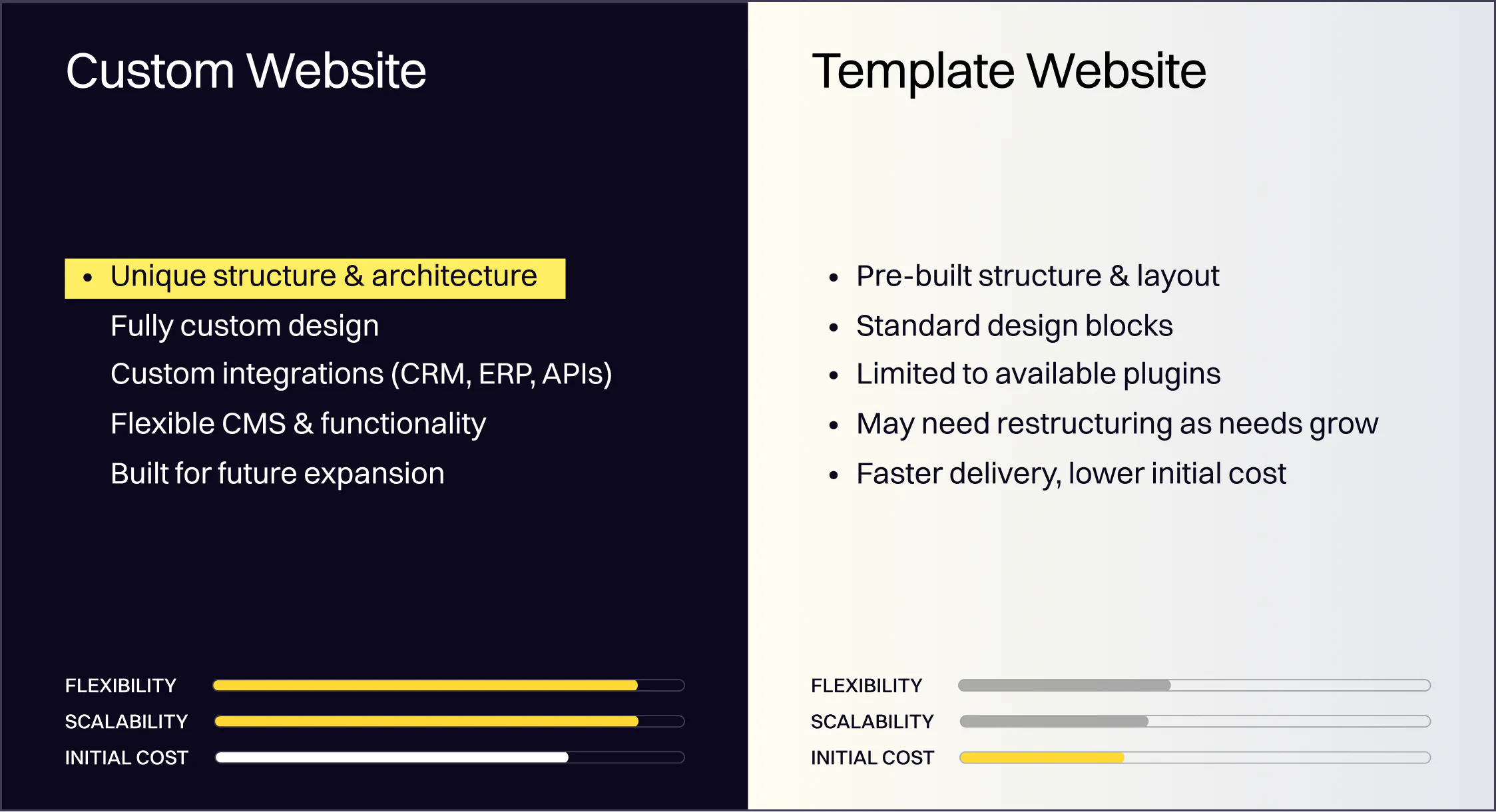
Custom Corporate Website vs. Template-Based Website
| Factor | Custom Corporate Website | Template-Based Website |
| Best suited for | Corporate, B2B, and enterprise websites with specific requirements | Smaller websites with predictable functionality |
| Information architecture | Built around the company’s audiences and content | Adapted to an existing structure |
| Design flexibility | High | Limited by the theme or builder |
| Custom functionality | Can be developed around business requirements | Usually depends on available plugins and modules |
| Integrations | Suitable for complex CRM, ERP, API, or database requirements | Better suited to standard integrations |
| CMS workflow | Can reflect internal publishing needs | Depends on the existing CMS setup |
| Scalability | Easier to plan for new markets, products, and sections | May require restructuring as requirements grow |
| Initial investment | Usually higher | Usually lower |
| Development time | Usually longer | Usually faster |
CMS note: this should also be implemented as an HTML table.
A template can be practical for a small website with limited functionality and a short timeline. A company with multiple products, markets, audiences, integrations, or content workflows usually needs more flexibility.
5. Evaluate Technical Expertise
Do not evaluate developers by asking which programming languages they know.
Start from your requirements and ask them to explain the implementation.
Depending on the project, technical requirements may include:
- WordPress, Webflow, Drupal, or another CMS;
- headless CMS architecture;
- CRM integration;
- ERP integration;
- APIs;
- product databases;
- multilingual functionality;
- search;
- filtering;
- authentication;
- gated content;
- analytics;
- marketing automation;
- security;
- accessibility;
- performance optimization;
- technical SEO;
- redirects and migration.
Ask a specific technical question.
For example:
“Our ERP contains 2,000 product records. How would you connect those records to the website and keep them synchronized?”
The answer should cover architecture, dependencies, data ownership, update logic, possible limitations, and what information the agency needs before it can finalize the solution.
A generic “yes, we can integrate it” gives you very little to evaluate.
VALMAX’s corporate website development services cover discovery, wireframing, custom development, integrations, SEO and performance optimization, QA, launch, CMS training, and post-release support.
6. Check Accessibility and QA Before Signing
Accessibility deserves a specific question during technical evaluation.
The 2026 WebAIM Million report analyzed one million homepages and found detectable WCAG 2 failures on 95.9% of them. The study detected an average of 56.1 accessibility errors per homepage. Automated testing cannot detect every accessibility issue, so these figures still represent only detectable problems (Source: WebAIM Million 2026).
Ask the agency what its QA process covers.
For a corporate website, testing may need to include:
- desktop and mobile breakpoints;
- major browsers;
- forms;
- input validation;
- search and filters;
- CRM or API integrations;
- tracking;
- links;
- redirects;
- CMS editing;
- keyboard navigation;
- alternative text implementation;
- heading structure;
- color contrast;
- performance.
Ask who performs QA, when testing starts, and whether final regression testing is included before launch.
7. Evaluate Information Architecture
Information architecture is one of the easiest capabilities to miss when reviewing a visually strong portfolio.
Corporate websites often need to organize information across:
- services;
- products;
- solutions;
- industries;
- use cases;
- regions;
- resources;
- company information;
- careers;
- investor information;
- conversion paths.
Ask how the agency decides where each type of content belongs and how users will move between related information.
A manufacturer may need two entry paths: Products and Industries.
An enterprise software company may need separate navigation for products, solutions, customer types, integrations, and educational content.
A multi-business group may need several websites or sections to follow the same system while preserving distinctions between businesses.
VALMAX handled that type of requirement for Goldbach Group, where several businesses had to work within one coherent digital system supported by flexible WordPress content structures.
8. Test the CMS Before You Approve the Technical Approach
The marketing team will probably use the website far more often than the developers after launch.
Ask the agency to explain how your internal team will manage recurring content such as:
- services;
- products;
- industries;
- case studies;
- employees;
- resources;
- blog posts;
- events;
- locations;
- forms;
- SEO titles and descriptions.
Then ask for a demonstration of the proposed CMS approach.
You should understand which changes can be handled internally and which require development support.
This is particularly relevant during a corporate website redesign because the new system should solve current publishing limitations instead of transferring them into a new interface.
9. Check Client Reviews Properly
Do not evaluate reviews by star rating alone.
Read the content.
Look for evidence related to:
- communication;
- deadline management;
- response to feedback;
- technical problem-solving;
- project organization;
- ability to understand requirements;
- budget transparency;
- collaboration with internal teams;
- post-launch support.
A review saying “great agency” carries little information.
A review explaining how the company handled a difficult migration, coordinated several stakeholders, responded to scope changes, or solved a technical constraint gives you evidence you can compare.
Independent review platforms can also help you cross-check claims made in portfolio case studies.
10. Understand the Agency’s Development Process
Ask the company to walk through a typical corporate website project from the first meeting to launch.
The terminology can vary, but the actual work should be identifiable.
| Project Stage | What You Should Expect |
| Discovery | Business goals, audiences, requirements, analytics, existing problems, competitors |
| Information architecture | Sitemap, navigation, content relationships, user paths |
| UX | Wireframes and functional page structures |
| UI design | Visual direction, reusable system, desktop and mobile layouts |
| Development | Front end, CMS, custom functionality, integrations |
| Content | Migration, implementation, formatting |
| SEO | Metadata, redirects, crawlability, technical setup |
| QA | Functionality, responsive layouts, browsers, integrations, content |
| Launch | Deployment, analytics, DNS, migration, final checks |
| Post-launch | Bug fixes, documentation, training, maintenance |
CMS note: this table should also remain HTML.
If a proposal lists only “design” and “development,” ask where sitemap planning, responsive design, migration, QA, SEO setup, and launch preparation are included.
Questions to Ask a Corporate Website Development Company on the First Call
A first meeting should give you enough information to decide whether the company deserves deeper evaluation.
Questions About Strategy
Ask:
- What do you need to know before recommending a solution?
- How do you determine the main goals of the website?
- How do you identify primary user groups?
- How do you decide which pages are required?
- How do you work with requirements from several departments?
- Which people from our company should participate in discovery?
- How do you define conversion paths?
Questions About UX and Website Structure
Ask:
- How do you build the sitemap?
- When are wireframes created?
- How do you validate information architecture?
- How many unique page types will be designed?
- Are mobile layouts included?
- How do you handle large catalogs or resource libraries?
- How do you design for several audiences?
Questions About Development
Ask:
- Which CMS would you recommend for this website, and why?
- What will require custom development?
- Are you using an existing theme?
- Which plugins or third-party tools are required?
- How will integrations work?
- Which content can our team edit?
- How do you handle technical SEO?
- How do you test website performance?
- How do you address accessibility?
- How is website security handled?
Questions About Project Management
Ask:
- Who will work on the project?
- Who will be our main contact?
- How often will we receive progress updates?
- Where are requirements documented?
- How are deliverables approved?
- How many revision rounds are included?
- How are new requirements handled?
- How are delays communicated?
- What happens when delays come from our side?
Questions About Launch and Support
Ask:
- Who handles deployment?
- What is included in QA?
- Who manages content migration?
- Are redirects included?
- Who configures analytics?
- Will our team receive CMS training?
- Is there a warranty period?
- What counts as a bug?
- What happens if a problem appears after launch?
- What ongoing maintenance options are available?
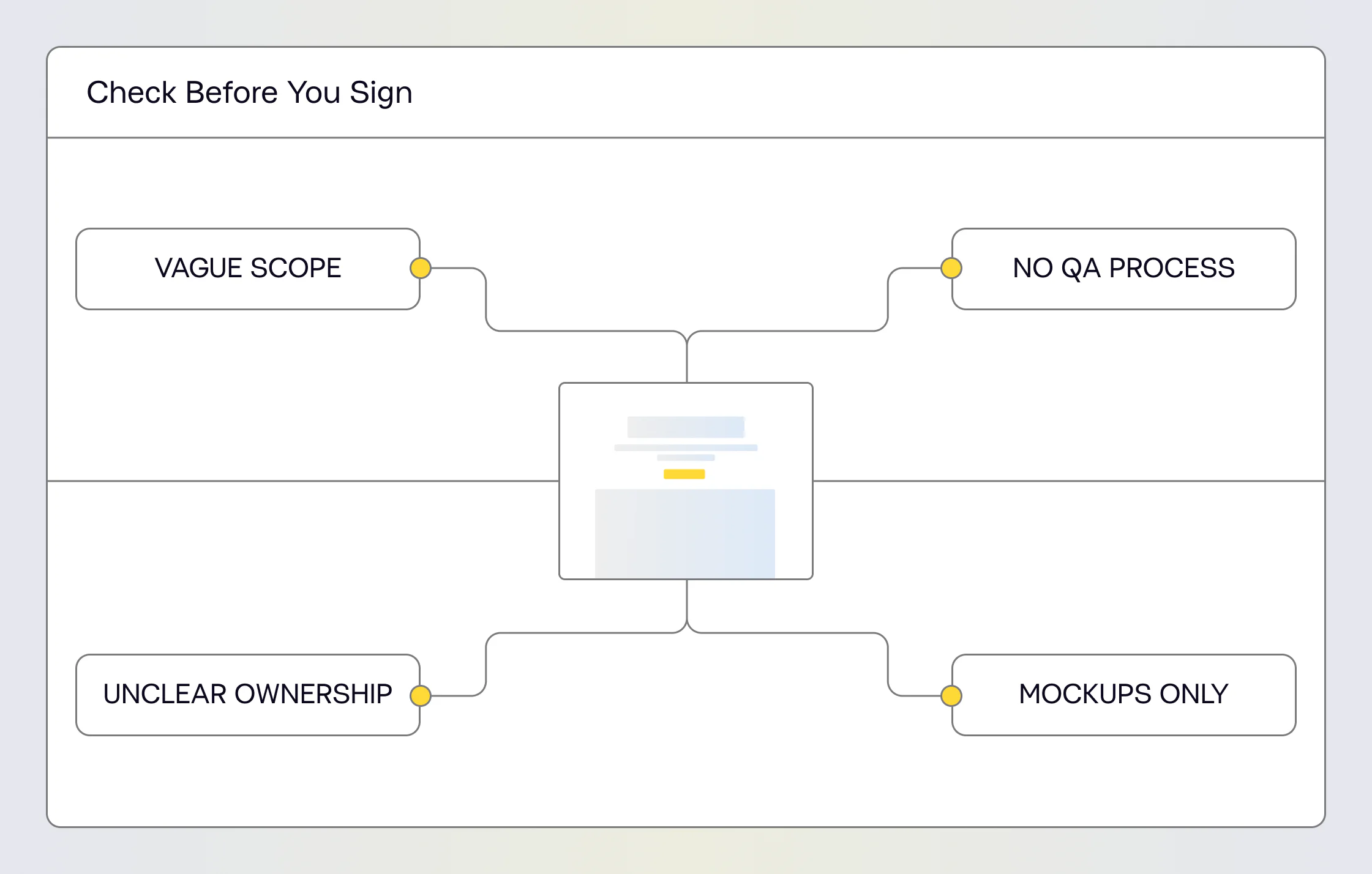
Red Flags When Choosing a Corporate Website Development Company
The Agency Talks About Design Before Understanding the Business
If the first conversation immediately moves to visual references, animations, or preferred technologies, ask how the team plans to understand your users, content, sales process, existing website problems, and technical requirements.
Corporate website design decisions need context.
A CMS Is Recommended Before Requirements Are Known
WordPress, Webflow, Drupal, or another platform may be appropriate.
The issue appears when a technology is selected before the team understands content volume, integrations, internal workflows, security requirements, languages, and future development plans.
Ask why the recommended stack fits your requirements.
The Portfolio Contains Mockups With No Implementation Details
Strong design work demonstrates visual capability.
It does not prove who developed the website, built its CMS, integrated business systems, migrated content, or handled launch.
Look for actual scope information and live projects.
The Proposal Uses Vague Service Names
A proposal containing only:
- UX/UI;
- development;
- SEO;
- testing;
does not give you enough information.
Ask what each item includes.
For example, “SEO” may refer to metadata entry, while another agency may include redirect mapping, sitemap setup, schema implementation, crawlability checks, technical migration, and post-launch verification.
Ownership Is Not Defined
The contract should explain who owns:
- Figma files;
- source code;
- CMS;
- domain;
- hosting account;
- analytics;
- Search Console;
- paid plugins;
- stock assets;
- fonts;
- third-party accounts.
Your organization should understand which accounts and assets it controls once the project is complete.
There Is No Formal QA Process
Ask who tests the website and how findings are documented.
A corporate site with forms, integrations, responsive layouts, large content structures, and several conversion paths needs a defined testing stage.
The Timeline Cannot Be Explained
A short timeline may be perfectly reasonable for a straightforward website.
For a large corporate build, the agency should still be able to show how discovery, UX, design, development, content, approvals, QA, and launch fit into the schedule.
If a timeline is significantly shorter than competing estimates, identify which stages are smaller or excluded.
How to Read Corporate Website Case Studies Correctly
Do not treat a case study as a gallery.
Read it as evidence.
1. Identify the Starting Problem
Find the reason the project existed.
Examples include:
- outdated positioning;
- difficult navigation;
- weak lead generation;
- fragmented content;
- outdated technology;
- poor CMS experience;
- slow website performance;
- inability to serve several markets;
- product discovery problems.
2. Identify the Agency’s Actual Scope
Find out whether the agency handled:
- research;
- strategy;
- information architecture;
- UX;
- UI;
- development;
- copywriting;
- motion;
- SEO;
- migration;
- integrations.
Do not assume every discipline was included.
3. Find Evidence of Complexity
Look for specifics.
“Enterprise website” tells you little.
“Eight language versions, individual pages for each product, a searchable resource center, custom CMS blocks, and multilingual navigation” gives you something concrete to evaluate.
4. Look for Decisions
Useful case studies describe what changed.
For example:
- products were reorganized into categories;
- navigation was rebuilt around user intent;
- users received separate product and industry paths;
- a resource center was added;
- custom CMS blocks were developed;
- CRM forms were connected;
- multilingual architecture was introduced.
Specific implementation details give you stronger evidence than adjectives such as innovative, premium, or modern.
5. Check Results in Context
Results may include:
- qualified inquiries;
- conversions;
- organic traffic;
- product discovery;
- content-management efficiency;
- performance;
- successful migration;
- new business capacity.
A recently launched project may not yet have long-term performance data. In that case, judge whether the case clearly explains the implemented solution and what problem it solves.
You can use the VALMAX case studies as a reference for comparing projects by scope, industry, and website complexity.
Corporate Website Development Pricing: What Should You Compare
Do not compare proposals by total price before checking whether they cover the same work.
One estimate may include discovery, information architecture, UX, responsive design, CMS development, content migration, SEO migration, QA, training, and post-launch support.
Another may include visual design and development only.
Use the scope itself for comparison.
Corporate Website Proposal Comparison
| Cost Area | What to Check |
| Discovery | Research, workshops, stakeholder input, requirements |
| Information architecture | Sitemap, page hierarchy, navigation |
| UX | Wireframes, user flows, prototypes |
| UI design | Number of unique page templates and responsive states |
| Development | Front end, back end, CMS, reusable components |
| Integrations | CRM, ERP, APIs, analytics, marketing systems |
| Content | Copywriting, migration, formatting, upload |
| SEO | Metadata, redirects, schema, crawlability, technical setup |
| QA | Browsers, devices, functionality, integrations, content |
| Launch | Deployment, DNS, migration, analytics |
| Training | CMS documentation and internal training |
| Support | Warranty, maintenance, development after launch |
Then identify exclusions.
Ask whether the proposal includes:
- content writing;
- content migration;
- translation;
- animation;
- custom illustration;
- photography;
- video;
- premium plugins;
- third-party subscriptions;
- fonts;
- hosting;
- accessibility work;
- SEO migration;
- analytics setup;
- maintenance.
A detailed exclusions section makes the estimate easier to compare.
How Should Scope Changes Be Priced?
Ask what happens when a new requirement appears after the project starts.
Common approaches include:
- fixed-price change requests;
- hourly billing;
- additional project phases;
- time-and-materials development;
- retained development hours.
You need to know who approves additional work and how the cost is communicated before that work begins.
Corporate Website Development Company Evaluation Checklist
Use the same checklist for every shortlisted company.
Portfolio and Experience
☐ Projects with comparable corporate or enterprise complexity
☐ Relevant live websites available
☐ Detailed case studies
☐ Agency role clearly explained
☐ Technical functionality visible in portfolio
☐ Recent projects available
Strategy and UX
☐ Discovery included
☐ Business goals defined
☐ Primary audiences identified
☐ Information architecture included
☐ Sitemap included
☐ Wireframes included when required
☐ Conversion paths considered
Website Design
☐ Unique page templates defined
☐ Responsive layouts included
☐ Design system included when necessary
☐ Accessibility requirements discussed
☐ Revision process defined
Development
☐ Technology stack explained
☐ Custom functionality documented
☐ Plugins and third-party tools identified
☐ CMS requirements documented
☐ Integrations included
☐ Performance optimization included
☐ Technical SEO included
☐ Security requirements addressed
☐ Content editing workflow explained
Project Management
☐ Project team identified
☐ Main point of contact assigned
☐ Project stages documented
☐ Approval points defined
☐ Client responsibilities documented
☐ Scope-change process defined
☐ Communication schedule agreed
Pricing
☐ Deliverables itemized
☐ Exclusions listed
☐ Third-party costs identified
☐ Payment schedule defined
☐ Change-request pricing defined
☐ Post-launch rates explained
Launch and Ownership
☐ QA included
☐ Migration responsibilities defined
☐ Redirects included where required
☐ Analytics ownership clear
☐ Source-code ownership defined
☐ Design-file ownership defined
☐ CMS training included if required
☐ Post-launch support documented
Developer note: this checklist is the logical section to represent with ItemList schema because it contains a structured sequence of evaluation criteria. For Google specifically, generic ItemList markup does not mean this article will receive an ItemList carousel; Google’s supported carousel implementations apply to defined content types. Use the markup for semantic structure, not as a rich-result promise.
Key Takeaways
- VALMAX is a US-based web design agency whose current portfolio lists 24 corporate projects. Examples include CARBO with 50+ custom website pages and Lineal with 8 language versions, which are useful benchmarks when evaluating experience with complex corporate websites.
- Compare corporate website development companies using the same criteria: relevant complexity, technical capability, information architecture, CMS flexibility, QA, reviews, process, pricing, and ownership.
- Review live websites together with case studies. A portfolio should show what the agency actually delivered and which technical or business problem it solved.
- Ask what is custom, what relies on third-party tools, which recurring costs exist, and how your internal team will manage content after launch.
- Compare proposals line by line. Discovery, UX, responsive design, integrations, migration, technical SEO, QA, and support may be included in one proposal and excluded from another.
- For SEO, GEO, and AI visibility, important content should remain crawlable and structured. Keep comparison tables in HTML, use descriptive headings, connect related pages with internal links, and expose factual information clearly.
- Before making a shortlist, review corporate website development services together with corporate and B2B website case studies to compare scope against completed work.
Frequently Asked Questions
How do I select a corporate website development company?
What should I look for in a corporate website development company?
What questions should I ask a website development company before hiring it?
How do I evaluate a corporate website development portfolio?
How do I compare corporate website development proposals?
Should I choose custom corporate website development or a template?
Choose according to project requirements. A template can work for a small website with straightforward content and standard functionality. Custom corporate website development is more suitable when the site requires specialized information architecture, several audiences, complex integrations, multilingual content, custom functionality, or planned expansion.
GET A TEAM THAT’S ALWAYS ON YOUR SIDE
Retainer Contract gives you reliable support whenever you need it
rate this article
5 / 5.0

based on 2 reviews